

Why people look for a Codex CLI alternative
Most people who search for an alternative to Codex CLI are happy with the idea: an agent in the terminal that reads the project, runs commands, edits files and checks its own work. What they want to change is one of three things.
- The price. Codex in the terminal is part of paid ChatGPT plans, or billed per token with an API key.
- The limits. Even on a paid plan, the flagship model runs out quickly on long agent tasks.
- The setup. Some want a desktop app next to the terminal, or a sandbox that sets itself up, without extra tools.
OmniRush keeps what works about Codex CLI, a terminal agent on frontier GPT models, and removes the bill.
What Codex CLI costs today
These figures come from OpenAI's Codex pricing page and the Codex CLI README, checked on 23 October 2026.
| Plan | Price | Codex in the CLI | Models listed |
|---|---|---|---|
| Free | $0 | Not listed | GPT-6 Luna in the desktop app, subject to rollout |
| Go | $8 a month | Not listed | GPT-6 Luna in the desktop app, subject to rollout |
| Plus | $20 a month | Yes | GPT-6.1 Sol and GPT-6 Luna on the plan card; GPT-6 Astra estimated at 5 to 45 local messages per 5 hours |
| Pro | From $100 a month ($100, $200 or $500) | Yes | Everything in Plus; no five-hour limit at present |
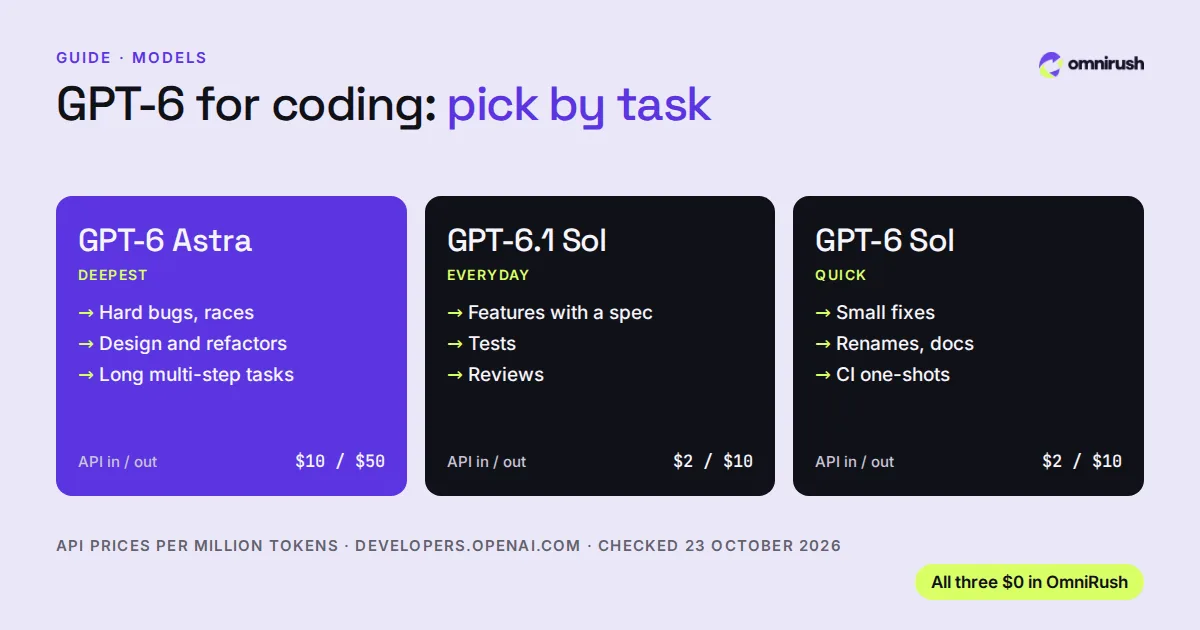
| API key | Pay per token | Yes | Your key's API models; GPT-6 Astra is $10 in and $50 out per million tokens |
OpenAI also notes that its usage estimates are not fixed limits, and that weekly limits may apply. Codex CLI itself is open source (Apache-2.0) and installs with npm, Homebrew or a script; the cost is in the plan or the API usage, not the tool.
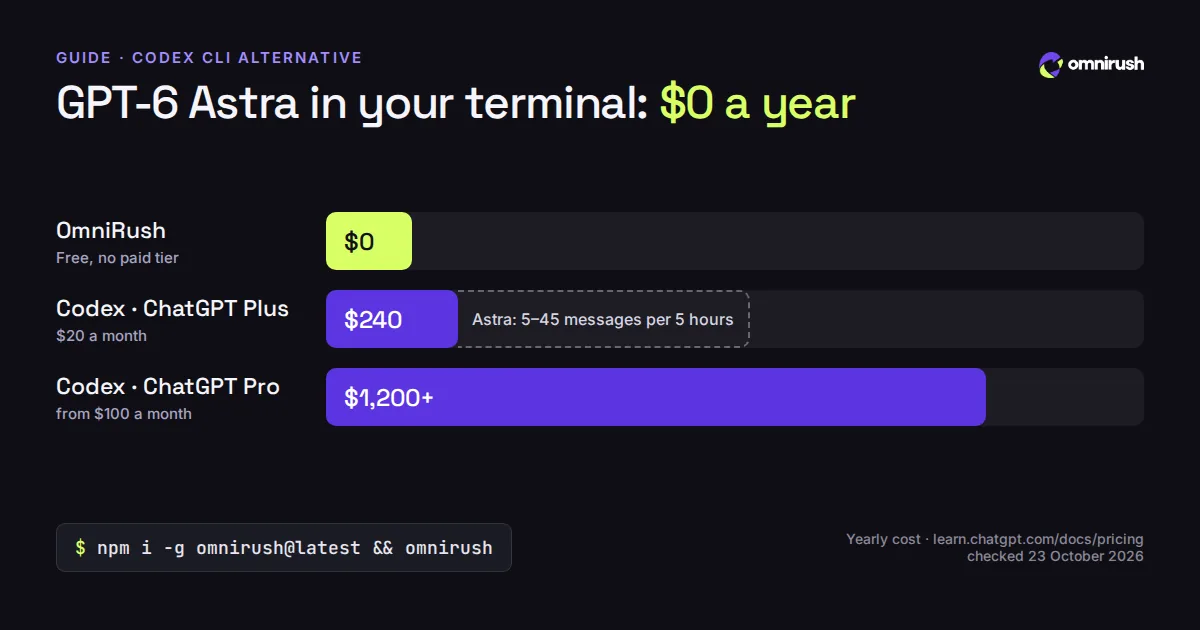
- OmniRush Free, no paid tier$0 a year
- Codex with ChatGPT Plus $20 a month$240 a year Astra: 5-45 messages per 5 h
- Codex with ChatGPT Pro From $100 a month$1,200 a year
OpenAI prices from learn.chatgpt.com/docs/pricing and the API model list, checked 23 October 2026. Usage with an API key is billed per token on top.
Keep what works about Codex CLI, a terminal agent on frontier GPT models, and remove the bill.
OmniRush and Codex CLI side by side
| Feature | OmniRush Free | Codex CLI |
|---|---|---|
| Terminal agent on a free plan | Free account | Plus, $20 a month, and up |
| GPT-6 Astra without paying | Default model | Paid plan or API key |
| GPT-6.1 Sol and GPT-6 Sol | Included | Paid plans |
| Desktop app | With swarm agents and IDE layout | Codex app |
| Windows, macOS and Linux | CLI on all three | All three |
| Sandbox for the agent's commands | Linux sandbox, set up for you | Built-in sandbox |
| No card or API key needed | Neither needed | Plan or API key |
Both are serious agents. The difference that matters to most people is the bill: with OmniRush, the same GPT-6 family costs nothing, and the allowance refills every day.
Move from Codex CLI to OmniRush in five minutes
- Create an account at omnirush.ai with a GitHub account at least 7 days old. Most sign-ups are approved right away.
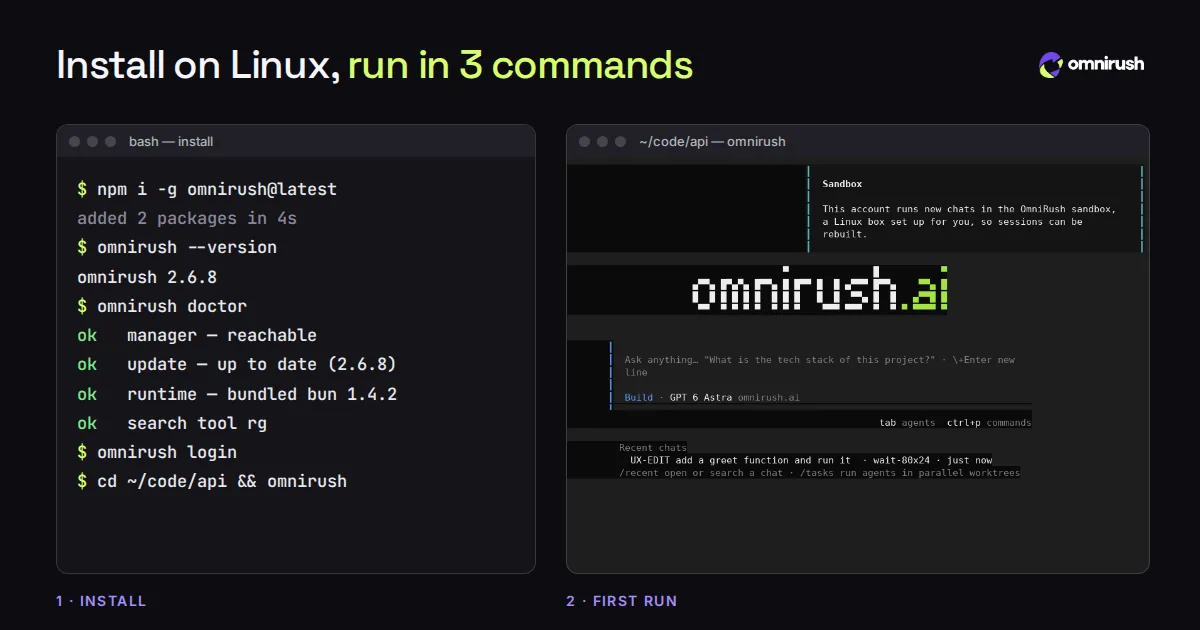
- Check Node.js: node --version should print 22.19 or newer. Then install with npm i -g omnirush@latest.
- Run omnirush login. Your browser opens to approve the device; over SSH it prints a link to open on any device.
- cd into your project and run omnirush. You get a full-screen agent on GPT-6 Astra.
$ npm i -g omnirush@latest
$ omnirush login
$ cd ~/code/api
$ omnirush
If your project already has an AGENTS.md written for Codex, keep it. OmniRush reads project notes from AGENTS.md too, and /init writes one when the project has none.
The commands you used in Codex, in OmniRush
| You want to | In OmniRush |
|---|---|
| Start an agent in this folder | omnirush |
| Run one task from a script or CI | omnirush -p "fix the failing test in tests/api" |
| Pipe something in | git diff | omnirush -p "review this" |
| Pick a model and effort | omnirush -m gpt-6.1-sol:high, or ctrl+x m and ctrl+t in the app |
| Resume the last chat | omnirush -c |
| Decide when it asks first | omnirush permissions careful | normal | auto |
| Review and fix your changes | /review, then /fix |
| Undo the last turn | /undo (keeps your own later edits) |
| Run tasks in parallel | /tasks, or omnirush agents start "<prompt>" |
What you get on top
OmniRush is built on the open-source opencode engine, and adds the parts you would otherwise put together yourself.
- Frontier GPT models for free: GPT 6 Astra, GPT 6.1 Sol and GPT 6 Sol, with a daily allowance that refills every day. No card, no paid tier, no API bill.
- A desktop app for Windows, macOS and Linux with swarm agents: ask for a swarm and several agents split one task side by side, then hand you one summary. It also has a code editor and an IDE layout beside the chat.
- A Linux sandbox that sets itself up: bubblewrap on Linux, WSL 2 on Windows with one admin prompt, and a small Linux VM of its own on macOS, with no Docker needed.
- Review, fix and undo built in: /review checks your changes, /fix fixes what it found, and one /undo takes back a whole turn while keeping your own edits.
- Hosted web search for the model, when it is available for your account, with the searches and their sources shown in the chat.
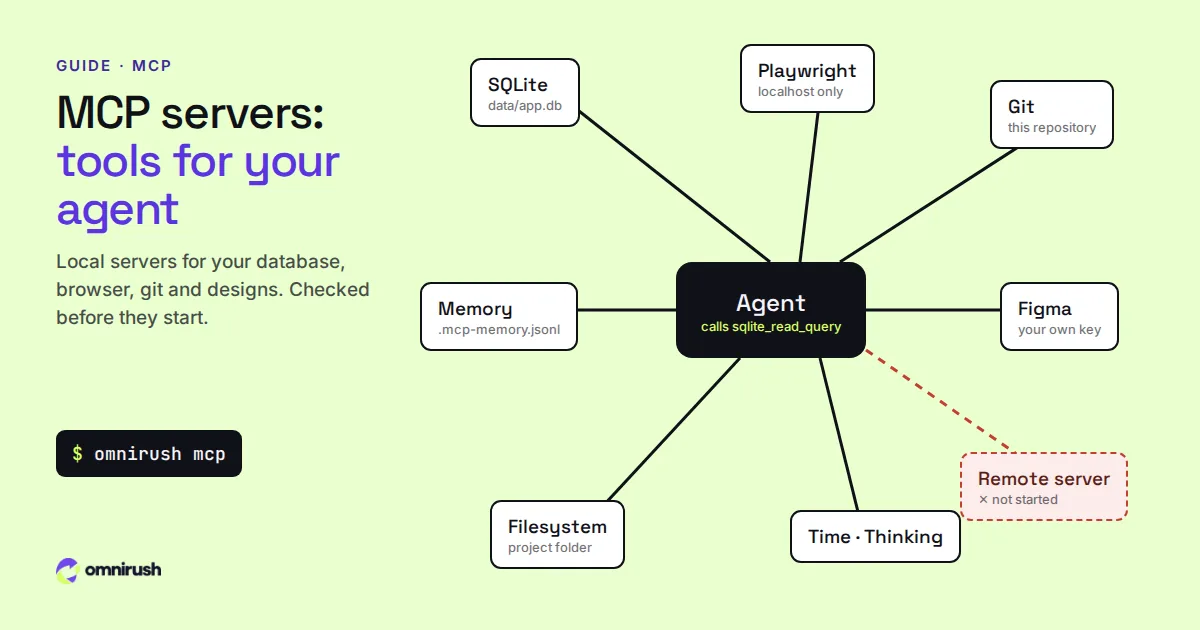
- MCP servers from a supported list: filesystem, git, SQLite, memory, sequential thinking, time, Playwright on local pages, and Figma with your own key.
When Codex CLI still makes sense
If your company already pays for ChatGPT Business or Enterprise, Codex is included in that plan. And if you need GPT-6 Luna for high-volume, low-cost work, that model is in Codex and not in OmniRush. For everyone else who wants GPT-6 Astra in a terminal without a monthly bill, start with OmniRush.
Coming from Claude Code instead? See OmniRush vs Claude Code. Want to know which GPT-6 model to use for which task? Read GPT-6 for coding.
Questions
Is there a free alternative to Codex CLI?
Yes. OmniRush is a free terminal coding agent on the same GPT-6 models: GPT-6 Astra by default, plus GPT-6.1 Sol and GPT-6 Sol, with a daily allowance that refills every day. It needs no card, no API key and no ChatGPT plan.
Can I use Codex CLI with the free ChatGPT plan?
Not in the terminal, as of 23 October 2026. OpenAI's pricing page lists Codex in the CLI from the Plus plan ($20 a month) up, or with an API key. The Free and Go plans list GPT-6 Luna in the desktop app, subject to rollout.
Does OmniRush use the same models as Codex?
It uses the same GPT-6 family: GPT-6 Astra, GPT-6.1 Sol and GPT-6 Sol. GPT-6 Luna is not offered. As OmniRush's Terms say, usage limits apply, and a request may be served by an equivalent or newer model while OmniRush tests models or manages capacity.
Will my AGENTS.md from Codex work in OmniRush?
Yes. OmniRush reads project notes from AGENTS.md, so the build commands and rules you wrote for Codex carry over. /init writes one when a project has none.
Does OmniRush run on Windows like Codex CLI?
Yes. The CLI runs natively in PowerShell or Command Prompt on Windows (x64 and arm64), and on macOS and Linux. The desktop app runs on Windows x64, macOS on Apple silicon and Linux. See the Windows guide.
Sources
Checked on October 23, 2026. Prices and features change: check each official page before you decide.
- Codex plans and pricing (learn.chatgpt.com)
- Codex CLI README (github.com/openai/codex)
- OpenAI API models and prices (developers.openai.com)
- OmniRush Privacy Policy (what is collected and how it is used)
- OmniRush Terms of Service (free access and allowances)
- OmniRush desktop app source and releases (GitHub)
- OmniRush command-line tool on npm
- OmniRush changelog (what each release added)
OmniRush is not affiliated with or endorsed by Anysphere (Cursor), Anthropic (Claude Code), Anomaly (opencode), the Freebuff and Codebuff team, OpenAI (GPT, Codex), Microsoft (Windows), Apple (macOS) or Figma. Product names are trademarks of their owners and are used only to identify their products.